
You can insure any shipment against loss or damage after buying its label. Insurance costs 1% of the declared value with a $1.00 minimum, and the quoted Insurance cost is shown before you commit. To insure every label for a flat fee instead, or if labels are already arriving insured, see Automatic insurance.
Add insurance
Insurance is available anywhere you see the Add insurance field:
- On the Print label tab, right after buying a label. The declared value is prefilled from the order total — change it to declare a different value, then click Add insurance.
- In a bulk batch, each row of the print view has its own insurance field, and Add insurance to all shipments insures every uninsured label in one click, each at its own order total.
- From Shipment history — open a shipment and add insurance from the manage shipment view.
Insurance can only be added while the shipment is still waiting for the carrier. Once the package has been scanned or collected, the option disappears.
An insured shipment shows Insured for $X along with the insurance fee you paid.
Automatic insurance
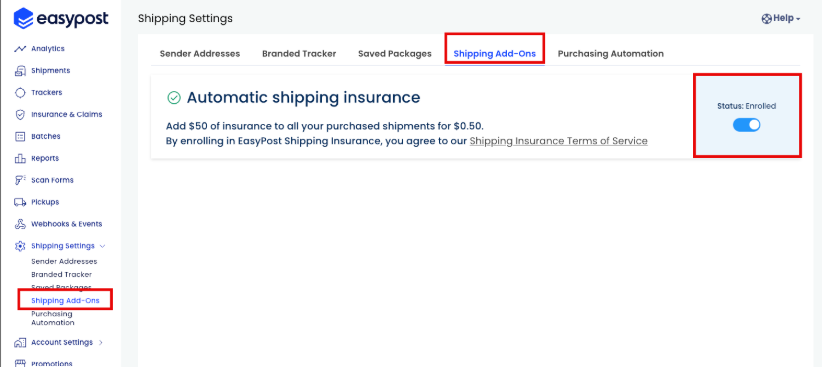
EasyPost's Automatic shipping insurance add-on insures every label bought through your EasyPost account for a flat $1.00 per label, covering up to $100 of loss or damage regardless of the order value. It's an EasyPost setting, not a Parcelcraft one, so it covers labels from the app drawer, 1-click ship, and the full-page app alike. While enrolled, each label shows Insured for $X and Insurance cost $1.00 the moment it's purchased, without you clicking Add insurance. To insure a shipment for a different amount, use Add insurance instead.
Turn it on or off under Shipping add-ons in your EasyPost dashboard. The status reads Enrolled or Not enrolled, and the change applies to labels you buy from then on.
File a claim
To make a claim on an insured shipment, open it from Shipment history and click Claim insurance, which opens EasyPost's claim form in a new tab.